VOKAR vs Anki
Keep the spaced repetition. Skip the card-making.
Learn vocabulary, not flashcard software. Anki is the classic tool for any subject; VOKAR is built for learning words on your phone. Here is where each one wins, and how to bring your Anki decks with you.
- Start with ready-made decks for your level
- Type a word, or tap words on a photo, and AI writes the cards
- Bring your Anki decks along

“Super easy to use, similar to anki but with a better interface”
Last updated October 2026
The short answer
Pick Anki if…
you study on a computer, want your cards on several devices, or learn things beyond languages (medicine, law, code) with images, audio or formulas.
Pick VOKAR if…
you're learning German, English, French, Italian, Dutch or Turkish on your phone and want good decks and new cards without building them by hand.
Not sure?
VOKAR is free to start and imports your Anki decks, so you can try it with the cards you already have.
Feature comparison
| Feature | VOKAR | Anki |
|---|---|---|
| Made for | Vocabulary for language learners | Any subject |
| Ready-made decks | Decks by CEFR level for 6 languages, each word with a meaning, an example and a fill-in-the-blank card | Thousands of user-made shared decks; quality varies |
| Making new cards | Type a word or photograph a page; AI writes the card | By hand, with flexible templates and add-ons |
| Spaced repetition | FSRS | SM-2 or FSRS (set in deck options) |
| Rating a card | 3 buttons or a swipe | 4 buttons |
| Images, audio, formulas | Text only | Images, audio, LaTeX and HTML |
| Platforms | iPhone, Android | Windows, Mac, Linux, iPhone, iPad, Android, web |
| Sync between devices | None; your data stays on your phone | Free through AnkiWeb |
| Customizing | Daily goals, streaks, reminders | Templates, deck options, add-ons |
| Price | Free plan; one language €4.99 once; Pro €3.99 a month | Free, except AnkiMobile for iPhone (one-time purchase) |
| Anki decks | Imports .apkg files (text only) | Its own format |
VOKAR's free plan: your own decks, Anki imports, the 100 most common words of every ready-made deck and 3 AI cards a day. Prices in euros; your store shows your local price. See all plans. Anki details from apps.ankiweb.net, October 2026.
What daily use feels like
With Anki
Anki rewards setup. Once you've chosen your note types, card templates, add-ons and deck options, you get a study system shaped exactly the way you want, on every device you own. It's at its best when you enjoy that control or study more than languages.
With VOKAR
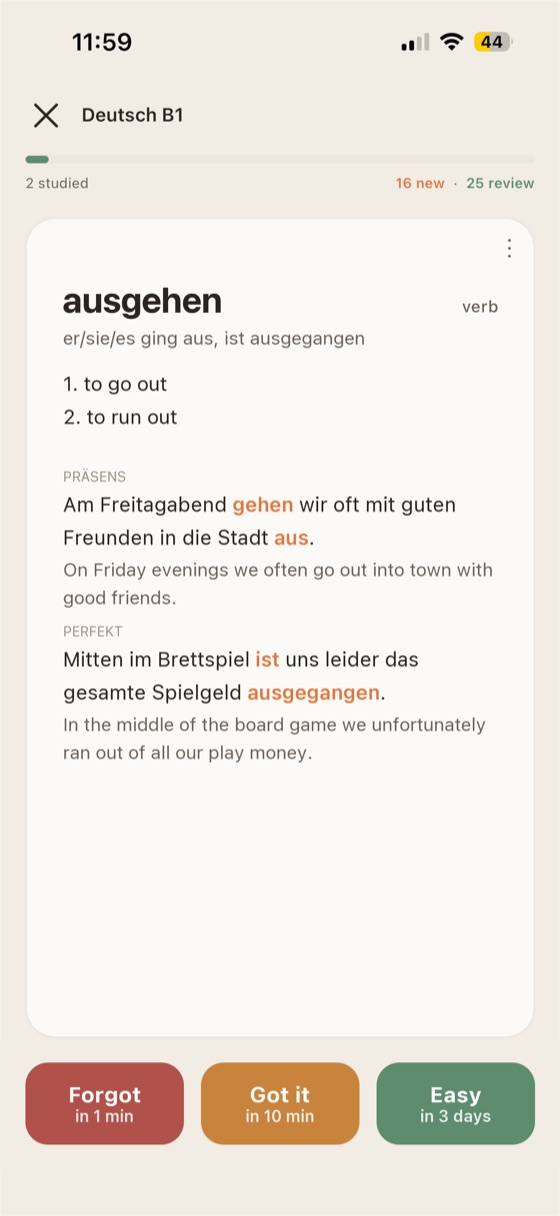
VOKAR skips the setup. Open the app, pick your language and level, and start. A new word you meet becomes a card in seconds, and the study screen gives you three buttons and nothing to configure. It's at its best when vocabulary is the goal and your phone is where you study.
Bring your Anki decks to VOKAR
- Export from Anki. Save your deck as an Anki Deck Package (.apkg) file.
- Open VOKAR. On the home screen, next to Your decks, tap Import.
- Pick the file. Every card's text comes along, ready to study. Images and audio don't import yet, and your Anki review history doesn't carry over: the cards start as new.
From learners who know Anki
“Vokar is a really useful vocabulary app. It’s simple, clean, and makes reviewing new words feel much easier and more organized. … I became quite frustrated with Anki lately and fortunately found this promising alternative”
“Super easy to use, similar to anki but with a better interface”
Best Anki Alternative“I use it for Turkish learning, and after 1 month only, I learned so many new words. I stopped using dictionary and using only Vokar. Whole Vocabulary in one app. Top!!”
Real reviews from the App Store and Google Play, quoted as written ("…" marks a cut).
Questions
Is VOKAR a good Anki alternative?
For vocabulary in German, English, French, Italian, Dutch or Turkish, VOKAR covers what most learners use Anki for, with the decks and card writing done for you. For other subjects, cards with images or audio, or studying on a computer, Anki is still the better tool.
Can I import my Anki decks into VOKAR?
Yes, for free. Import an .apkg file and every card's text comes along, ready to study. Images and audio aren't imported yet, and your Anki review history doesn't carry over, so the cards start as new.
Is VOKAR free like Anki?
Partly. Studying your own decks, Anki imports and the 100 most common words of every ready-made deck are free forever, with 3 AI cards a day. Every ready-made deck for one language costs €4.99 once, and Pro (€3.99 a month) unlocks every language and 100 AI cards a day.
Does VOKAR use the same spaced repetition algorithm as Anki?
VOKAR uses FSRS, the modern spaced repetition scheduler that Anki also offers. VOKAR runs it with its own settings, so your review dates won't match your Anki schedule exactly. You rate each card with three buttons instead of four.
Does my data leave my phone?
Your decks, cards and study history stay on your phone, unless you choose to share a deck. When you make an AI card, the word you typed goes to our server to write the card. The app also sends anonymous crash reports and a daily count of active installs, never linked to you. No ads, no third-party trackers. Details in the privacy policy.
Can I use VOKAR and Anki together?
Yes. They don't conflict: keep Anki for other subjects, import the vocabulary decks you want into VOKAR, and study words on the go.
Try VOKAR with your own Anki decks.
Free to start, and your Anki decks come with you.